How to Rename Modules on the Website
This guide shows how to rename module labels and routes in BookingCore. There are two main methods: updating router prefixes in .env, and changing language text via the Translation Tool. Always back up your files and database before making changes.
1. Change via Router (update .env)
Step 1: Open the project folder and edit the file bc-cms/.env.
Step 2: Modify the router prefix values for the modules you want to rename. Example:
PAGE_ROUTER_PREFIX='newname'
SPACE_ROUTER_PREFIX='newname'
HOTEL_ROUTER_PREFIX='newname'
BOAT_ROUTER_PREFIX='newname'
TOUR_ROUTER_PREFIX='newname'
EVENT_ROUTER_PREFIX='newname
'
Note: After changing these values you may need to clear caches and restart your server (or PHP-FPM) if required.
2. Change via Translation Tool
- Step 1: Go to
Dashboard > Tools > Translation Tools. - Step 2: Click Find Translation to load all translation content.
- Step 3: When translations are loaded (e.g. the system shows > 3814 words), open the English file to start editing.
- Step 4: In the Search by key box enter the original term (for example
Space) to list all occurrences, then replace it with the desired word (for exampleApartment).
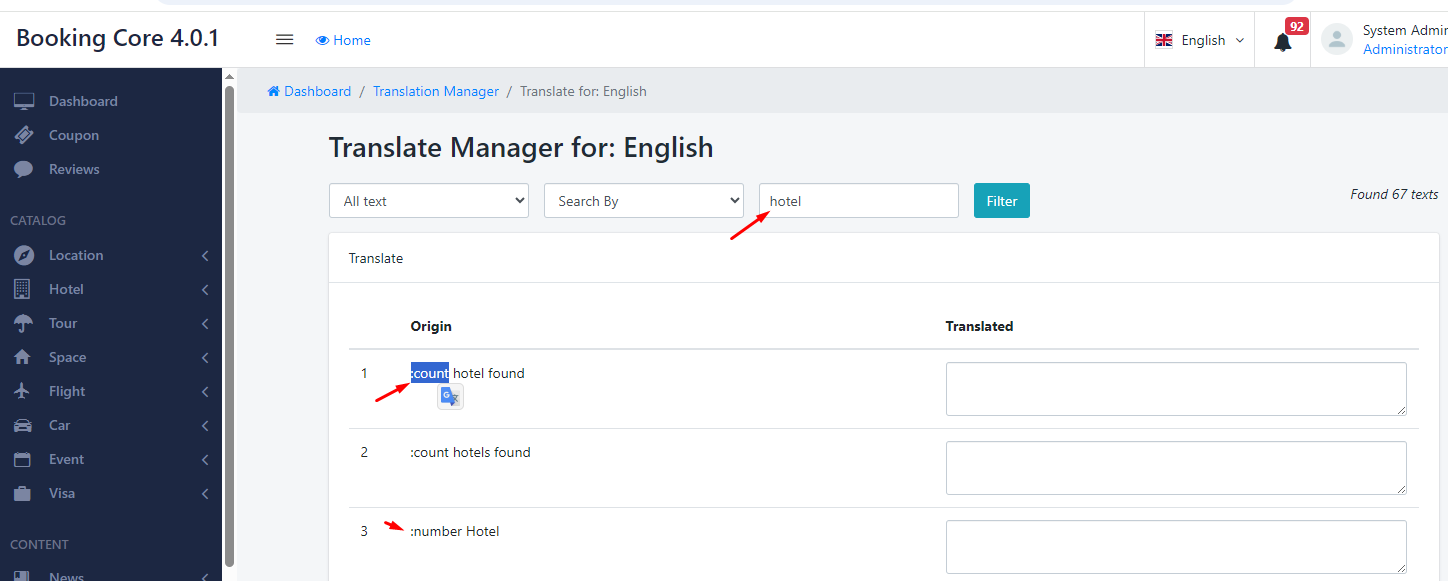
Important Warning
⚠️ Do not change any keys or strings that begin with a colon (e.g. :count hotel, :num hotel). These are variables/placeholders used in code translations — modifying them will likely break functionality or cause errors.
Final Steps & Tips
- Always backup
.env,public/uploadsand any important files before making changes. - After renaming, clear application cache and translation cache if applicable:
php artisan cache:clear
php artisan config:clear
php artisan view:clear
php artisan route:clear- Test the site thoroughly (frontend and admin) to ensure links and routes work correctly.
If you need, we can provide a short checklist or perform the rename for you — just contact our support team.
Was this article helpful?